Troubleshooting Call Forwarding Issues
Last updated: May 13, 2026
If your call forwarding is not working properly, there are several potential causes and solutions to consider.
Common Issues and Solutions
Direct Call Forwarding Without AI Response
Currently, it is not possible to forward calls directly without the AI assistant answering first. The AI always picks up the call and begins the conversation - this is a technical limitation of the system.
If you need calls forwarded without any AI interaction, you should set up call forwarding directly through your phone provider or telephone system instead of using fonio.
SIP-Based Call Forwarding Problems
When using SIP numbers, call forwarding issues often occur due to compatibility problems between your telephone system and fonio's SIP REFER commands.
Requirements for SIP forwarding:
The following IP ranges must be whitelisted in your phone system configuration (particularly important for PBX systems like 3CX):
143.223.88.0/21
161.115.160.0/19
Your telephone system must support SIP REFER commands
The system must be properly configured to handle external forwarding targets
Some providers may block certain forwarding attempts
Call Forwarding Loops and Unanswered Forwards
Understanding the Problem:
When you see "forwarding successful" in your call logs, this means the call was sent to your phone system, but it does not guarantee someone answered at the destination. If the forwarded call is not answered and your phone system redirects it back to fonio, this creates a new call with the AI assistant. This is why you may see the same person calling multiple times within minutes, each unanswered forward creates a new call entry.
Symptoms of Call Forwarding Loops:
Hearing a brief ring tone before being reconnected to the original answering system
The AI assistant answers the same call multiple times as if it’s a new call
Typical Sequence:
Initial system answers the call
Call is forwarded to an extension/number
The PBX detects the extension doesn’t answer or is busy and redirects the call back to the original number
The initial system answers again as if it’s a new call
Root Cause:
An internal forwarding rule or call routing plan in the PBX creates a fallback path back to the original number.
Critical Configuration Requirements:
For proper handling of unanswered forwards, your phone system must reject (not redirect) the call when no one answers. When a call is rejected, the AI assistant understands that forwarding failed and can continue the conversation with the caller, offering to take a message or provide alternative assistance. If your system redirects unanswered calls back to fonio instead of rejecting them, the AI will incorrectly believe the forwarding was successful.
Configuration Checks to Prevent Loops (for PBX systems like SwyxLT):
Verify if there is a fallback/overflow forwarding rule pointing back to the main number or the forwarding source number, this must be deactivated or redirected elsewhere
Review under what conditions the PBX forwards calls (busy, no answer, always)
Configure employee extensions so that unanswered calls route to voicemail or another endpoint, NOT back to the main number or forwarding source
Check your phone system settings to ensure unanswered forwarded calls are configured to reject rather than redirect back to the originating number.
Warning: Do not set up explicit call forwarding from the AI assistant’s number back into the PBX system when experiencing forwarding loops, as this will worsen the problem by creating exactly the mechanism that causes the loop.
Forwarding Tool Configuration
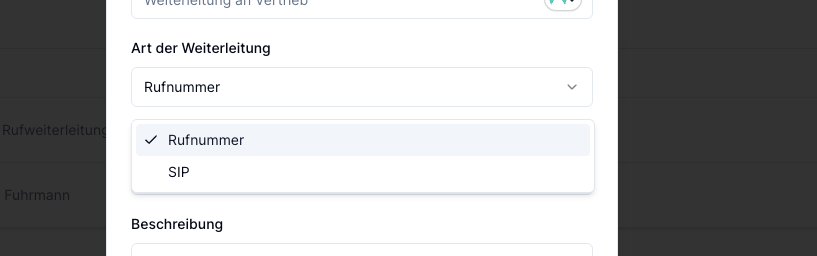
Ensure your call forwarding tool is set up correctly:
Go to your Assistant → Tools → Add Tool → "Call Forwarding"
Enter the target number in international format (e.g.,
+43...)Save the configuration
Test with a real call
Prompt Configuration Issues
Problems can occur if your prompt instructions are ambiguous or conflicting. Make sure your prompt clearly instructs when and how to use the forwarding tool, without contradictory statements that might confuse the AI.
Provider-Specific Issues
Zadarma
While Zadarma claims to support SIP REFER, many users experience forwarding failures. The provider may not properly handle the SIP REFER commands sent by fonio.
Recommended Providers
For reliable call forwarding, consider using:
Twilio - Over 5000+ numbers successfully deployed with fonio
Telnyx - Currently being tested and showing good results
Alternative Solutions
If SIP-based forwarding continues to fail:
Consider switching to a compatible SIP provider like Twilio
Set up call forwarding directly through your phone carrier using USSD codes
Use fonio's native phone numbers for guaranteed compatibility
For persistent issues, contact support with specific call logs and your current configuration details.