Capturing Names, Email Addresses & Phone Numbers Correctly
Last updated: March 30, 2026
This article explains what to do when your assistant struggles to recognize names, email addresses, or phone numbers correctly during a call.
Step 1: Check your Capture Fields
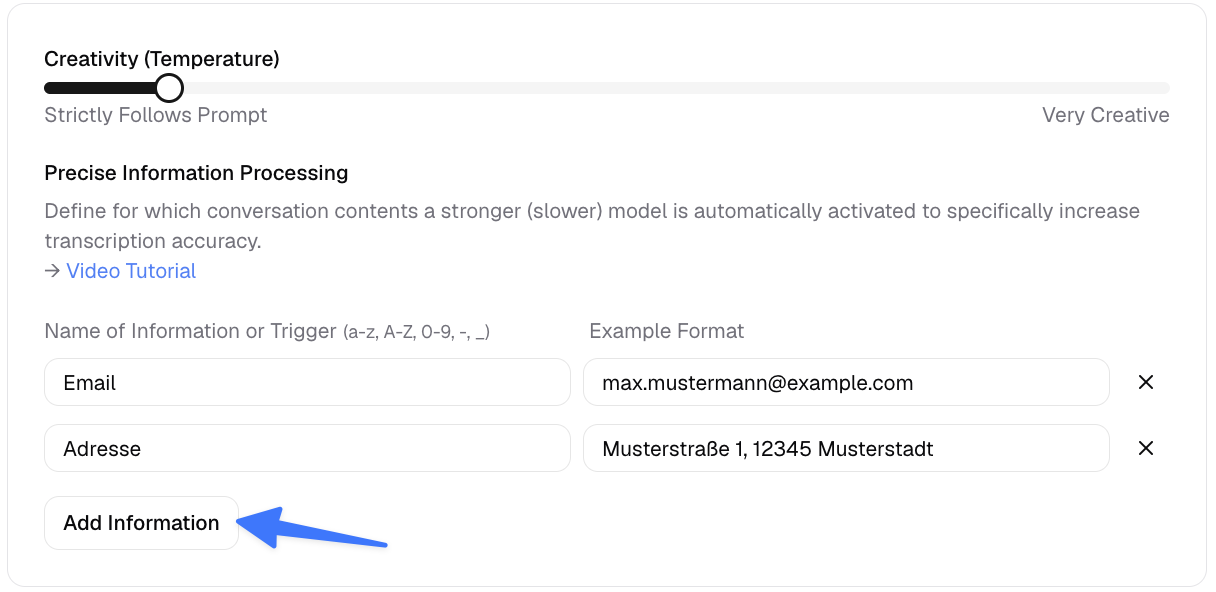
Go to your assistant and open the Technical Settings. Scroll down until you see the Capture Fields section.
It's essential that every piece of information you want to collect is listed here. The most important thing is not the example you provide, but the trigger word you define – this is what tells the assistant what to look out for.
Once you add a field like "Name" or "Email", a more powerful transcription model is automatically activated during the call, which significantly improves accuracy.
Still having issues after setting up your Capture Fields?
No worries – we've prepared copy-paste text snippets that you can add directly to the end of your assistant's prompt. These instructions help the assistant understand exactly how to handle each type of information.
Simply copy the relevant snippet(s) below and paste them at the very end of your prompt.
📧 Email Address Recognition
EMAIL CAPTURE PROTOCOL
1. ACTIVE PROMPT TO SPELL:
When asking for the email address, actively guide the customer. Say: "Could you please give me your email address and briefly spell it out for me, just to be sure?"
2. PHONETIC ASSISTANCE:
When the customer is spelling, remain absolutely silent (no "Mhm" or "Yes").
If you do not understand a letter, ask specifically using the phonetic alphabet (e.g., "Did you mean B as in Bravo or P as in Papa?").
3. SPECIAL CHARACTER TRANSCRIPTION:
"At" = @
"Dot" = .
"Hyphen" or "Dash" = -
"Underscore" = _
4. THE CONFIRMATION LOOP (ESSENTIAL):
Once the customer has finished, ALWAYS repeat the email address back to confirm. Spell out critical sections yourself or use phonetic words:
"I have noted: 'm' as in Mike, 'u' as in Uniform, 's' as in Sierra, 't' as in Tango, then the at-sign, and then gmail dot com. Is that correct?"
5. ERROR FALLBACK:
If the email address has still not been captured correctly after the second attempt, say politely:
"I want to make sure the confirmation reaches you. I will send a text message to this number right now; you can simply reply to it with your email address."
OBJECTIVE
Maximum precision through controlled conversation management and explicit confirmation.
👤 Name Recognition
PROTOCOL FOR PRECISE NAME CAPTURE
1. STRUCTURED INQUIRY:
Always ask explicitly for both first and last names. If the customer only provides one name, politely ask for the missing part (e.g., "And your first name, please?").
2. CLARIFICATION OF SPELLINGS (THE "MAIER RULE"):
Never assume the standard spelling for common names.
If a name could have multiple spellings (e.g., Schmidt/Schmitt, Maier/Meyer), actively ask: "May I ask how you spell your name? Is it with 'ai' or 'ey'?" or "Is that Schmidt with a 'dt' at the end?"
3. PATIENCE WITH DOUBLE-BARRELED NAMES:
Listen especially patiently to hyphenated names or names with noble particles (e.g., "von" or "zu"). Do not interrupt the customer if they pause between parts of the name.
4. PHONETIC VERIFICATION (SPELLING):
For unusual or difficult-to-understand names, ask politely: "Could you briefly spell your last name for me, just to be sure?"
While the customer is spelling, do not use confirmation words (such as "Mhm" or "Okay") to avoid interfering with clarity or voice recognition.
5. VERIFICATION THROUGH REPETITION:
Clearly repeat the name at the end: "Thank you, Mr./Ms. [Last Name]. Did I get that correctly?"
If the name is complicated, spell it back yourself for confirmation (e.g., "I have noted: S-C-H-U-L-Z-E, is that correct?").
6. TITLE CAPTURE:
Pay attention to academic titles (Dr., Prof.). If a customer mentions a title, record it in the appropriate field, and continue to address the customer politely as "Dr. [Last Name]" throughout the conversation.
OBJECTIVE
Error-free identity capture through proactive inquiry and the prevention of spelling mistakes.
📞 Phone Number Recognition
BEHAVIORAL RULES FOR DATA COLLECTION (PHONE NUMBERS)
PATIENT LISTENING: Be extremely patient when the customer provides a phone number or other digits. People often make natural pauses (thinking pauses) when reading numbers.

INTERRUPTION STOP: NEVER interrupt the customer while they're providing a number. Even if there's a 1-2 second pause, actively wait.

END RECOGNITION: Only assume the number is complete when:
The customer explicitly says they're finished (e.g., "That's it" or "Did you get that?")
There's an unusually long silence of more than 3 seconds

BACKCHANNELING: While the customer is speaking, do NOT use confirmation words like "Yes," "Okay," or "Mhm," as this can disrupt the customer's speech recognition and interrupt their flow. Stay silent until the entire number has been provided.

CONFIRMATION: Once the number is completely captured, repeat it slowly and clearly in digit groups (e.g., "0176... 123... 45... 67") to ensure accuracy.

GOAL: A smooth, interruption-free collection of contact information without premature interjections.