Fixing stuttering or interrupted greeting messages in phone assistant
Last updated: May 15, 2026
If your phone assistant's greeting message is stuttering or getting interrupted frequently, this is typically caused by audio sensitivity settings that are too low or speech speed that's not optimized. Here are the key settings to adjust:
Audio Settings Adjustments
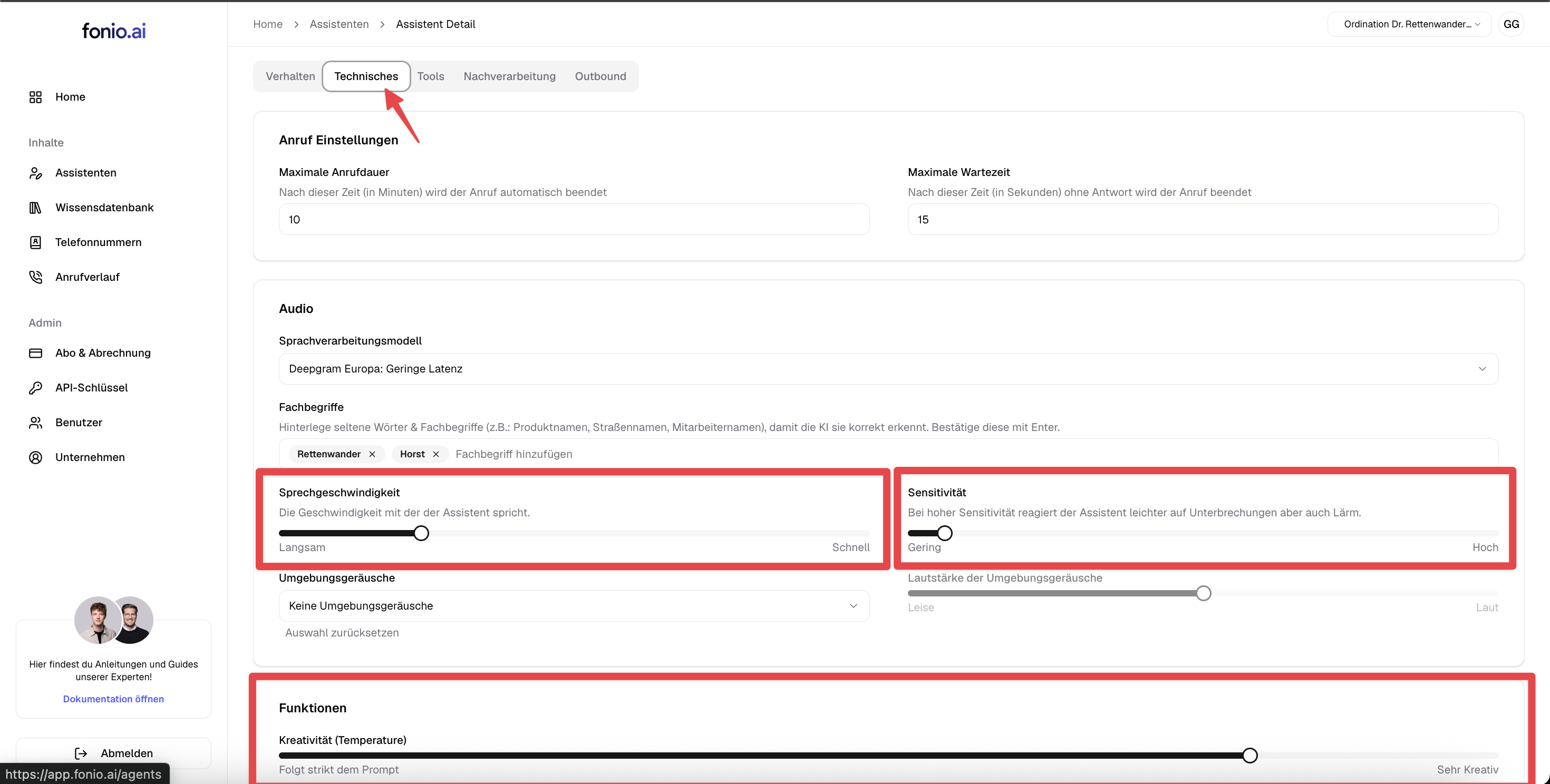
1. Speech Speed
Set the speech speed to a slightly reduced level rather than very slow or very fast. Extremely slow speech can cause stuttering issues.
2. Sensitivity Settings
Lower the sensitivity setting if it's currently set too high. When sensitivity is too high, the assistant interprets minor background noise as customer responses and may interrupt its own greeting. Lower sensitivity prevents this self‑interruption.
3. Creativity Level
Lower the creativity setting to ensure the assistant sticks closely to your predefined responses rather than generating its own variations, which can cause hesitation.
Additional Optimizations
Greeting Message Content
Write out abbreviations in full (e.g., "Doctor" instead of "Dr.") so the AI doesn't need to interpret abbreviations, reducing processing delays.
Voice Selection
Test different voice options to find the one that sounds most natural for your use case, as some voices may perform better than others.
Interruption Prevention
Make sure the "Prevent interruption of greeting message" setting is enabled to avoid customers accidentally cutting off the initial message.
To locate the “uninterrupted greeting message” setting, navigate to the Technical tab and look under Functions.
Call Forwarding Configuration
If stuttering persists after adjusting all audio settings, check your call forwarding setup. When call forwarding is configured through intermediate devices (such as a FritzBox router using internet telephony), network latency can cause the assistant to start speaking before the connection is fully established, resulting in the first 2-3 seconds being cut off or garbled.
To resolve this, configure call forwarding directly through your network provider's telephony centre rather than through router-based internet telephony. This bypasses the additional connection delay and ensures the assistant only begins speaking after the connection is stable. Contact your network provider to set up direct call forwarding if you're experiencing persistent stuttering that doesn't improve with audio settings adjustments.
After making these adjustments, test your phone assistant with several calls to ensure the greeting message plays smoothly without interruption.