Search Query
Last updated: March 19, 2026
Here you will learn how to use fonio to initiate a search query on the internet.
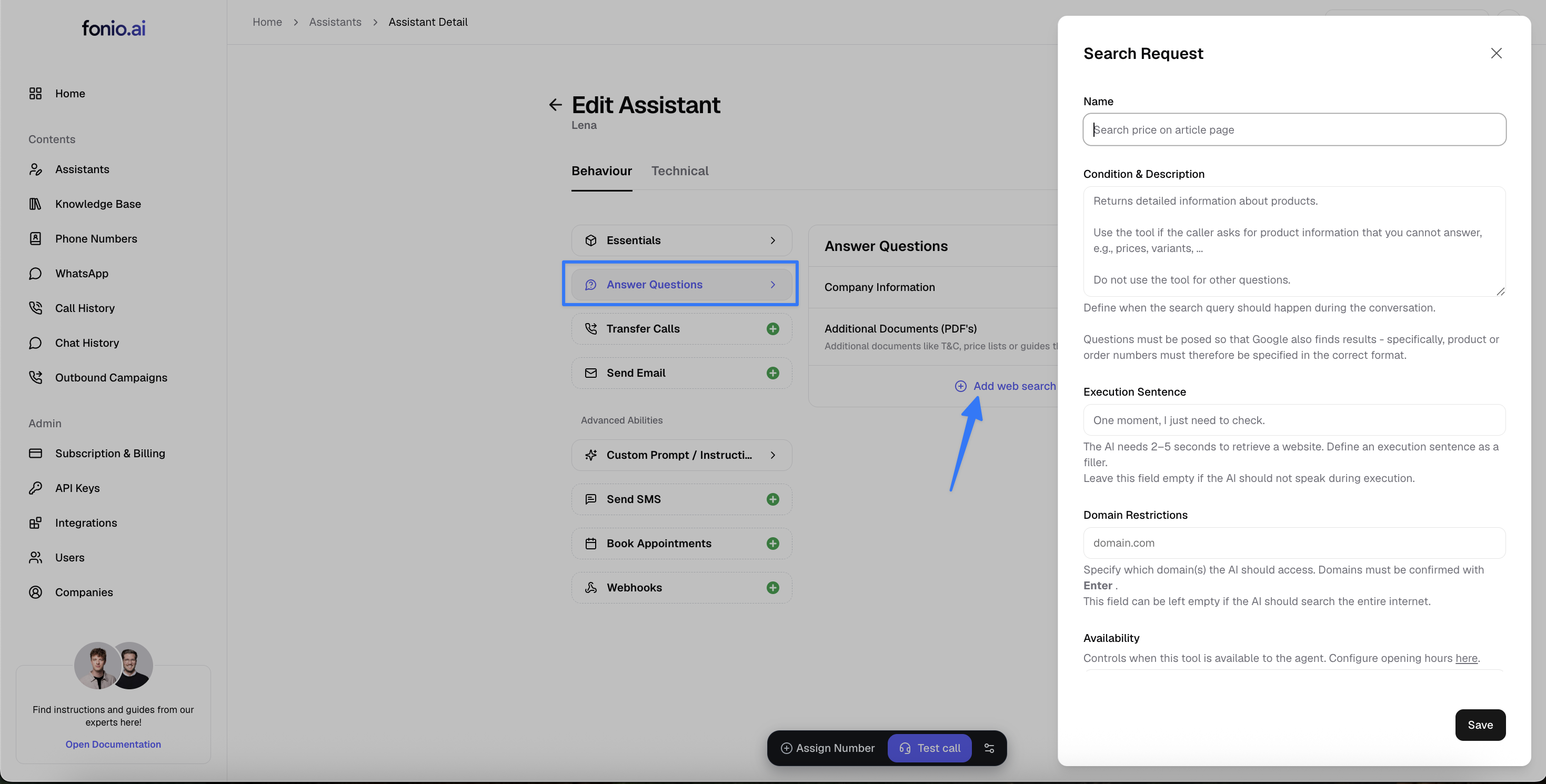
With the option Add web search, the AI can access websites live during the conversation and provide answers. This is suitable for information that needs to be retrieved from the internet in real time. Information that does not need to be current can be better and more easily retrieved via the knowledge base.
Overview
Live web search during calls
Duration per request: 2–5 seconds
Optional: Access limited to defined domains only
Recommendation: Trigger search only when truly necessary
When should the search query be used?
When the caller asks for specific information that is so current it cannot be represented in the prompt or knowledge base.
When should the search query not be used?
For internal status inquiries. Examples: order status, invoices, customer data. Use internal systems via API or forward to a human instead.
Condition and description
It is important here to describe the search query for the AI.
Include the following information: what results are to be expected here and the condition under which the search query should be triggered.
Example: “When the caller wants precise information about product availability.”
Execution phrase
The AI needs 2–5 seconds for a page retrieval. Define a short phrase as a filler.
Examples:
One moment, I need to check quickly.
I am checking that for you.
I will look that up briefly.
This makes the query during the conversation feel more natural, and the caller does not feel like they have to wait a long time.
Domain restrictions
Limit the search to trusted sources or brand websites.
Examples:
domain.comsupport.manufacturer.deshop.brand.at
Domains must always be confirmed with Enter. The field can remain empty if the AI is allowed to search the entire internet.
Integration into your prompt
You can integrate the search query into your assistant as follows:
## Caller wants information about product availability
If the caller asks a question about the delivery availability of our products:
- Ask which product they are interested in
- Then use the tool "Search Query" to find out the current availability
- Respond to the caller whether and when the desired product is available
If you need help setting this up or are unsure how to optimally integrate the search query into your process, just contact us at support@fonio.ai – we are happy to assist you!